Search that actually finds it
Full-text over every bookmarked post — body copy, author, article title and preview. Filter by folder, media type or date when you only half-remember it.
Turn your X bookmarks into a searchable library.


10,000+ users300+ paying customers
Live demo
Running on sample data. The folders, the toolbar and the search behave the way they do inside the app.
In their words
Real posts from X, not solicited quotes. The same set the pricing page shows.
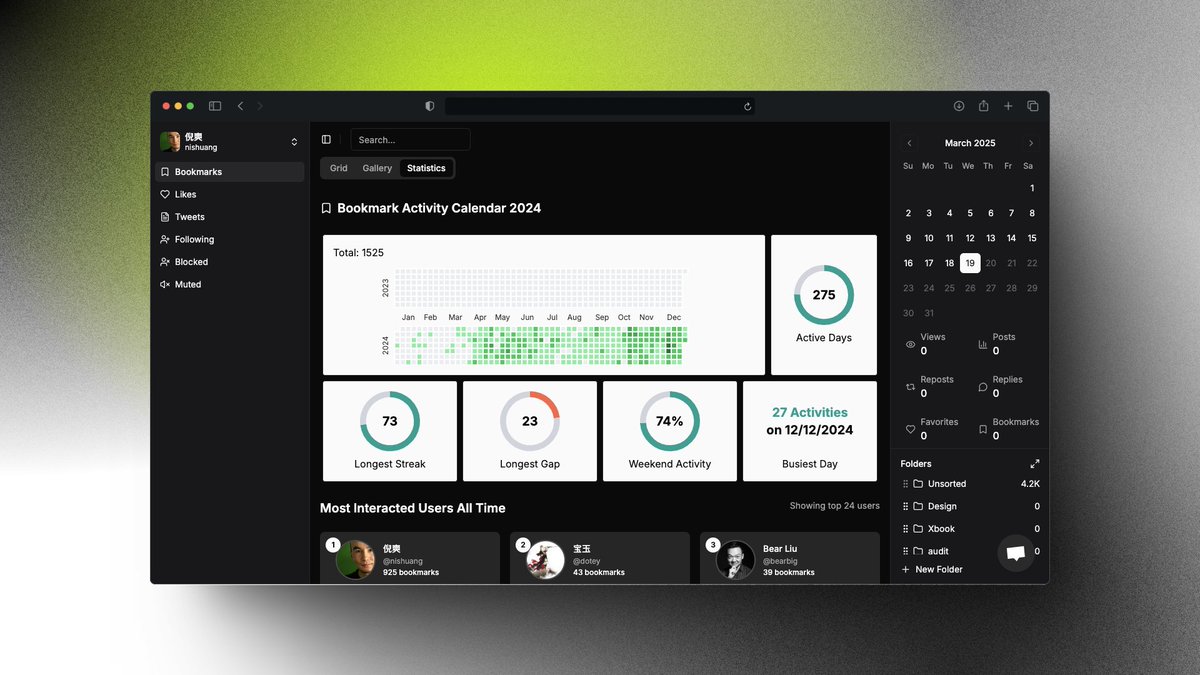
 倪爽@nishuang
Continue to recommend my secret productivity tool Twillot To put it simply, it does what Musk did not do, turning X into an information management tool: managing the tweets, favorites, and like records I have sent, and using AI to automatically classify them... I have more than 4,000 collections, hehe All data i…
 +1
+1 Ding@dingyi
I recommend the Twitter efficiency management tool Twillot, which can easily manage tweets, favorites, and like records. It also supports AI automatic organization, which is much more convenient than the official one. You can also automatically synchronize, create folders, batch download, and export to various for…

 Bear Liu@bearliu
As a Twitter user with 100,000 followers, I get a lot of information here every day. But its native experience is a real headache. The biggest pain point is bookmarks. Thousands of tweets in favorites are piled up in a mess, and you can't find them when you want to find them. I spent a long time looking for a sol…

 Ties@Toodooit
📱 I just used Twillot to organize two years of Twitter bookmarks and discovered a lot of forgotten treasures! I particularly like its AI classification function - it automatically classifies my 1000+ bookmarks by topic, making it super easy to find. And all data is stored locally, which is particularly reassurin…
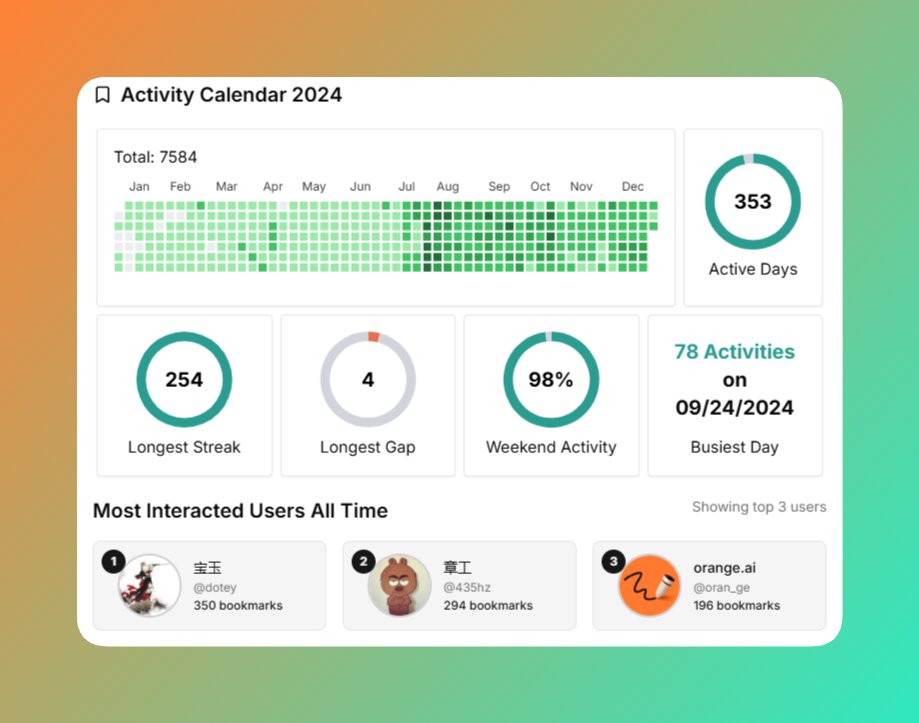
 向阳乔木@vista8
Yangyi recommended twillot many times, and I just installed it for the first time today. Among all the tweet collections in history, some of the tweeters with the largest number are: 1. @dotey Teacher Baoyu 2. @op7418 Hidden 3. @geekbb Geek 4. @HiTw93 Tw93 5. @oran_ge orange Not listed one by one. I remember t…

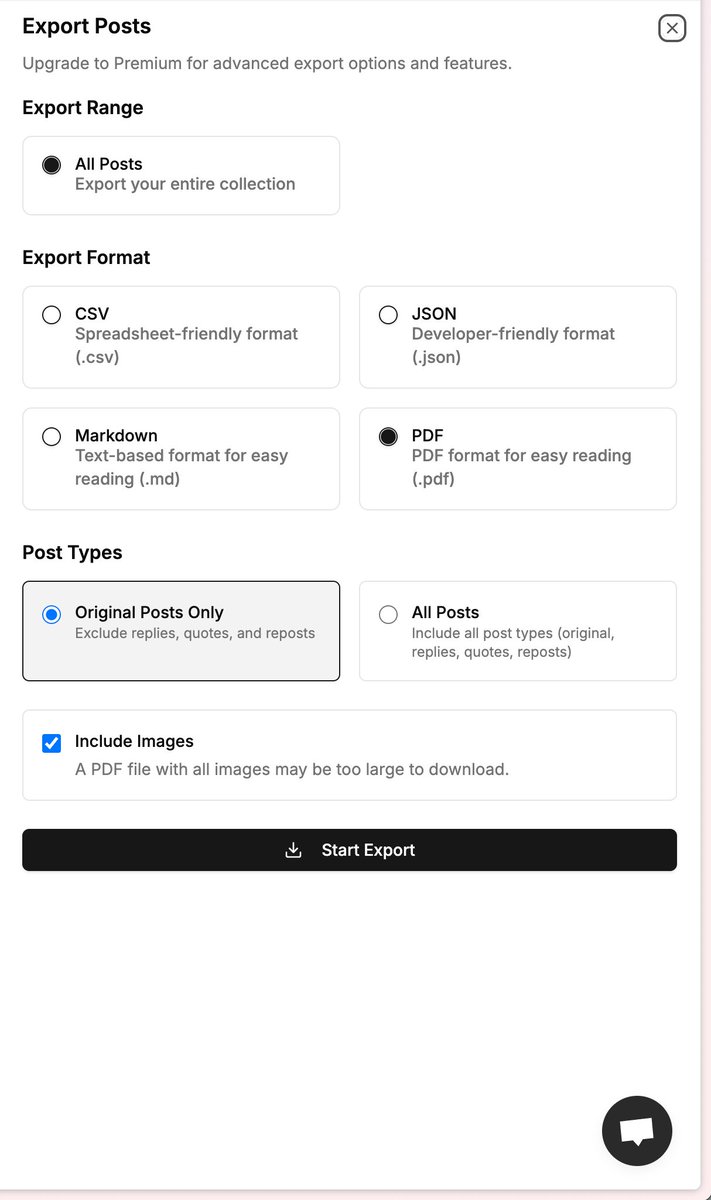
 dontbesilent@dontbesilent
I would call @mytwillot the Twitter Indie God! I struggled a lot the past few days and didn’t know how to export all my tweets. Last night, my brother told me that twillot has been supported, and he opened the grayscale beta for me. In less than 10 seconds, I exported all my tweets Images of all tweets are ret…
 +1
+1Social proof
Every number here is one you can go and check yourself.
10,000+
Chrome Web Store installs
Twillot has been in the store since 2023 and is still shipping weekly.
See the listing600+
mentions on X
Unprompted posts from people using it. We read and reply to all of them.
Read them live300+
paying customers
Researchers, marketers, journalists and founders on a paid plan.
How it works
Most people have never once found an old bookmark on X. The fix takes about a minute.
Step 01
Add Twillot to Chrome, Edge, or Brave. It runs against your own logged-in session — no password, no API key, nothing to configure.
Step 02
One click pulls the entire history — including the ones buried past X's scroll limit — plus every image, video, and thread attached to them.
Step 03
Full-text search across every saved post, folders you can rename and regroup, and one-click export to Obsidian, Markdown, CSV, or PDF.
The numbers
Bookmarking on X is write-only by design. Twillot is the read side.
500k
Posts on one account
The Pro ceiling. Most archives never come close, but the index does not slow down if yours does.
3,200+
Bookmark ceiling, gone
X stops scrolling somewhere past 3,200. Twillot keeps reading until there is nothing left.
0
Bookmarks sent to us
The archive and its index live in your own browser. That is why search is instant.
Features
Three things X never gave you, plus the small stuff you only notice once it is missing.
Full-text over every bookmarked post — body copy, author, article title and preview. Filter by folder, media type or date when you only half-remember it.
Create at least three folders, select the posts you want to organise, then run AI classification. You stay in control of folder names, colours, and groups.
Obsidian, Markdown, CSV, PDF, or a media folder on disk. Nothing is locked in, including when you decide to leave.
Pull the full-resolution images and original-bitrate video out of any saved post, in bulk.
Deleted posts and suspended accounts stay readable. Your copy does not depend on theirs.
The same workspace handles likes, your own posts, replies, following, and lists.
Select up to 500 at a time to re-file, export, or delete. No one-by-one clicking.
View public posts, save useful research, and clean up your X account without piecing together unreliable utilities.
Why this exists
I had nine thousand bookmarks on X and had never once found an old one.
That is not a discipline problem. Bookmarking on X is write-only: no search, no folders, no export, and the list stops scrolling long before it stops. Everything you saved past that point is technically still there and practically gone.
Twillot is the tool I wanted to already exist. It reads your bookmarks in your own browser and keeps a copy you control.
— Simon, building Twillot in the open
Pricing
Free
$0forever
No card, no expiry
More than 95% of users never need to pay for anything else.
Mini
$2.49/ month
Yearly is 50% off
For getting a real bookmark history under control.
Basic
$4.99/ month
Yearly is 50% off
The one most people land on once the archive is a research library.
Pro
$9.99/ month
Yearly is 50% off
Maximum ceilings, plus everything on the roadmap as it ships.
Yearly billing is 50% off every paid plan right now. 14-day money-back guarantee.
FAQ
If yours is not here, mail us — a human answers.
A bookmark manager for X. It syncs everything you have ever bookmarked into one workspace, sorts it into folders, and makes the whole archive searchable and exportable. Think of it as the read side of a feature X only ever built the write side of.
No. Twillot is a browser extension that runs against the session you are already logged into. We never see your credentials, and there is no API key to generate.
Chrome, Edge, Brave, Arc, and anything else built on Chromium. Firefox and Safari are not supported yet.
Usually under a minute. Very large accounts — tens of thousands of bookmarks with media — can take a few minutes. You can keep using the browser while it runs.
Yes. That scroll ceiling is why most people assume their old bookmarks are gone. Twillot keeps paging until there is genuinely nothing left, so the archive includes the ones you can no longer reach by scrolling.
Yes. Re-running the sync picks up everything new, so the archive stays current without you rebuilding it.
Your copy stays readable. Once a post is in your archive, it survives the author deleting it, going private, or being suspended.
The free plan holds 1,000 posts. Mini raises that to 10,000, Basic to 100,000, and Pro to 500,000. The same ladder applies to stored user profiles.
First, manually create at least three folders. Then select the posts you want to organise and run AI classification. Twillot will place them in the most suitable folders based on their content. You can rename, recolour, regroup, or delete folders at any time.
The full text of the post, the author name and handle, and article titles and previews. You can narrow by folder, media type, or date range from the filter panel.
Yes — likes, your own posts, replies, following and follower lists, and X Lists all live in the same workspace with the same search and export.
Yes. Select rows and move them to a folder in one action — up to 50 at a time on Free, 200 on Mini, and 500 on Basic and Pro.
In your own browser. The index is local, which is why search returns instantly and why we cannot read your bookmarks even if we wanted to.
Obsidian, Markdown, CSV, PDF, and a plain media folder on disk. Export is available on the free plan too — we would rather you could leave.
Yes, in bulk and at full resolution. Video comes down at the original bitrate rather than a re-encode.
There is a 14-day money-back guarantee. Cancelling stops the sync; the archive already on your machine stays there and stays exportable.
Sync your X bookmarks once and find out how much of your own research you have been carrying around unreadable.